Collision
In the previous chapter we added a temporary floor clamp to stop the player falling off the screen. Now let’s replace that with real collision detection.
First, remove the start_y field from Player and the floor clamping logic in update — we won’t need them any more.
Collision detection
First, we need a way to check whether a given tile position is solid.
Add this method to the Level struct:
impl Level {
    fn collides(&self, tile: Vector2D<i32>) -> bool {
        if !self.bounds().contains_point(tile) {
            return false;
        }

        let idx = (tile.x + tile.y * self.width as i32) as usize;

        self.collision_map[idx / 8] & (1 << (idx % 8)) != 0
    }
}
This is the reverse of what we did in the build script.
We find which byte the tile is in (idx / 8) and which bit within that byte (idx % 8).
If that bit is set, the tile is solid.
Ground detection
We need to know when the player is standing on something so they can jump.
Add is_on_ground to the Player:
impl Player {
    fn is_on_ground(&self, level: &Level) -> bool {
        let position_to_check = vec2(
            self.position.x,
            self.position.y + 8 + Number::from_raw(1),
        );
        level.collides(position_to_check.floor() / 8)
    }
}
We check one sub-pixel below the bottom of the sprite.
If there’s a collision there, we’re standing on something.
The + 8 accounts for the half-height of the sprite (since position is the center), and Number::from_raw(1) adds the smallest possible sub-pixel offset.
How collision response works
Collision detection (asking “is there a solid tile here?”) is straightforward. Collision response (deciding what to do about it) is the hard part, and contributes significantly to how your game feels.
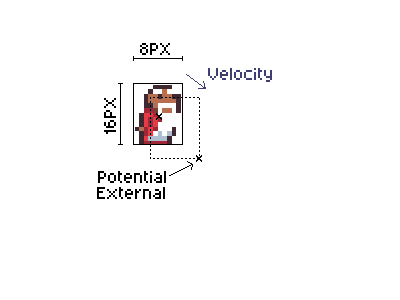
Our approach handles each axis (X and Y) independently. For each axis, we:
- Calculate where the player would be after applying velocity (
potential). - Find the leading edge of the sprite in the direction of movement (
potential_external). For horizontal movement, this is 4 pixels from center (the sprite’s half-width). For vertical movement, this is 8 pixels from center (the sprite’s half-height). - Convert that edge position to tile coordinates.
- If the tile is not solid: move to the potential position.
- If the tile is solid: snap the player so their edge is flush with the tile boundary, and zero the velocity.
By handling each axis independently, we avoid corner cases where diagonal movement could clip through walls.
The collision handler
impl Player {
    fn handle_collision_component(
        velocity: &mut Number,
        position: &mut Number,
        half_width: i32,
        colliding: &dyn Fn(i32) -> bool,
    ) {
        let potential = *position + *velocity;
        let potential_external = potential + velocity.to_raw().signum() * half_width;

        let target_tile = potential_external.floor() / 8;

        if !colliding(target_tile) {
            *position = potential;
        } else {
            let center_of_target_tile = target_tile * 8 + 4;
            let player_position =
                center_of_target_tile - velocity.to_raw().signum() * (4 + half_width);
            *position = player_position.into();
            *velocity = 0.into();
        }
    }

    fn handle_collision(&mut self, level: &Level) {
        Self::handle_collision_component(&mut self.velocity.x, &mut self.position.x, 4, &|x| {
            level.collides(vec2(x, self.position.y.floor() / 8))
        });
        Self::handle_collision_component(&mut self.velocity.y, &mut self.position.y, 8, &|y| {
            level.collides(vec2(self.position.x.floor() / 8, y))
        });
    }
}
Let’s walk through handle_collision_component step by step:
potential: where the player’s center would be after applying velocity.potential_external: the leading edge of the sprite in the direction of movement. We usevelocity.to_raw().signum()to get the direction (+1 or -1) and multiply by the half-width to find the edge.target_tile: the tile coordinate that the leading edge would enter.- If no collision: we simply move to the potential position.
- If collision: we find the center of the colliding tile, then position the player so their edge is just outside it. The
4 + half_widthaccounts for half of the tile (4 pixels) plus half of the sprite, ensuring the edges are flush. We also zero the velocity to stop movement in that direction.
The handle_collision method calls the component handler twice: once for X (using a half-width of 4 pixels) and once for Y (using a half-height of 8 pixels).
Each closure checks for collisions using the current position on the other axis.
The order matters: handling X first means horizontal movement is resolved before vertical. This gives the player priority for barely making it onto a ledge, if you’re jumping diagonally toward a platform edge, the X position is corrected first, which can make the difference between landing on top and crashing into the side.
Updating the update function
Now replace the update method on Player with the full version that includes gravity and collision:
impl Player {
    fn update(&mut self, input: &ButtonController, level: &Level) {
        let on_ground = self.is_on_ground(level);

        self.handle_horizontal_input(input.x_tri() as i32, on_ground);

        if input.is_just_pressed(Button::A) && on_ground {
            self.handle_jump();
        }

        self.velocity.y += num!(0.05);
        self.velocity.x *= 15;
        self.velocity.x /= 16;
        self.handle_collision(level);

        self.update_sprite();
    }
}
The key changes from the previous chapter:
on_groundnow uses the realis_on_groundcheck instead of the temporary floor clamp.- Instead of
self.position += self.velocity, we callself.handle_collision(level)which applies velocity while checking for collisions. - The
start_yfield and floor clamping are gone — collision handles everything now.
Update the main function to pass the level to update:
#[agb::entry]
fn main(mut gba: agb::Gba) -> ! {
    let mut gfx = gba.graphics.get();
    gfx.set_background_palettes(tiles::PALETTES);

    let level = levels::LEVELS[0];
    let mut bg = World::new(level);
    let mut input = ButtonController::new();

    let mut player = Player::new(level.player_start.into());

    loop {
        input.update();
        bg.set_pos(vec2(0, 0));
        player.update(&input, level);

        let mut frame = gfx.frame();

        bg.show(&mut frame);
        player.show(&mut frame);

        frame.commit();
    }
}
Run the game now — the wizard should stand on platforms, run left and right, and jump with the A button!
What we did
We’ve added tile-based collision detection and response. The player can now stand on platforms, walk along them, and jump. Not many games come with a single level though — in the next chapter we’ll add win detection and multiple levels.